
The Difference Between Plain Text and HTML Emails
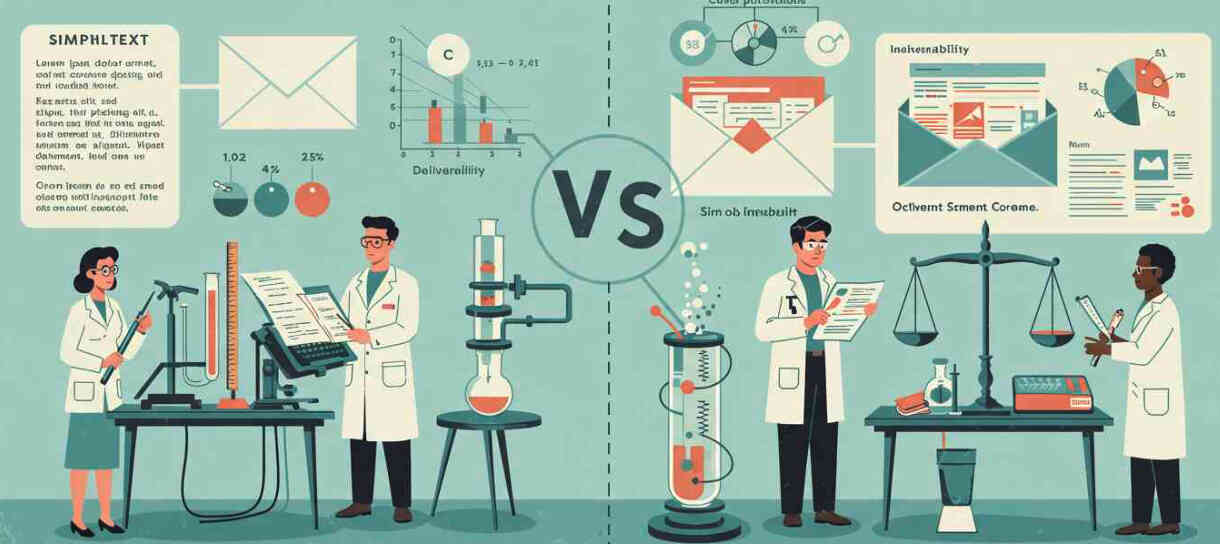
Could a 10+ year debate be coming to an end? We look at plain text emails vs HTML emails and help you pick the right one for your business.
It's a debate that's been going on for more than a decade, with many swearing by either side. But there is a right answer, and it's not quite as clear cut as many would hope.
This guide covers everything you need to know about plain text and HTML emails, helping you choose the right format for your email.
HTML vs Plain Text: What's the Difference?
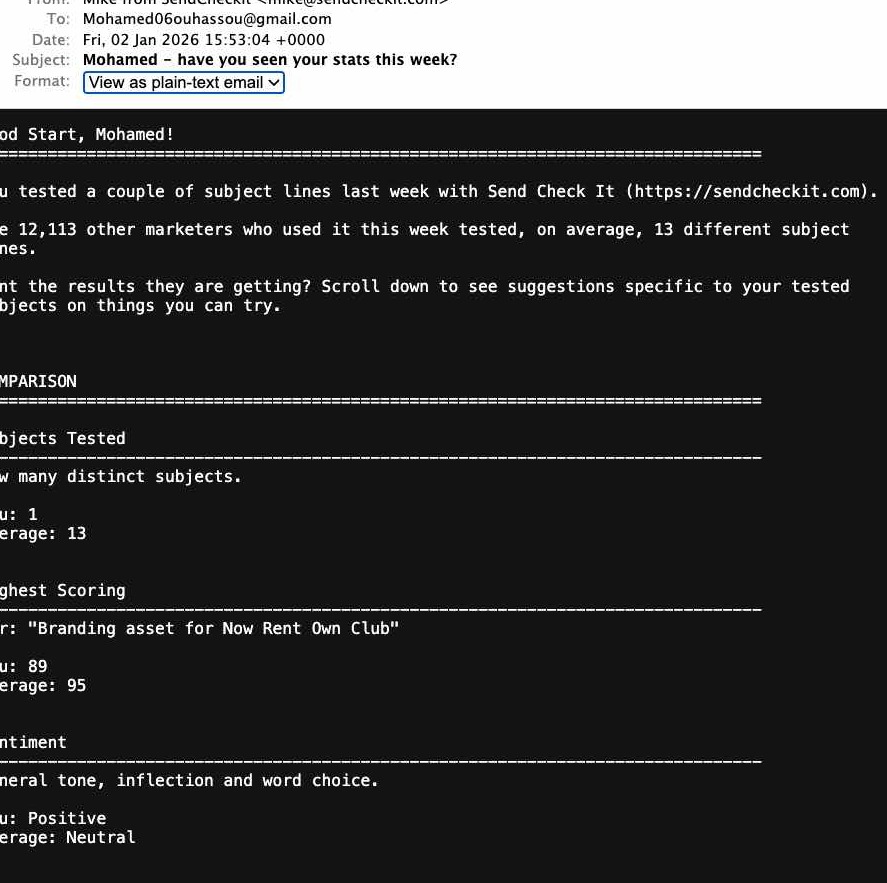
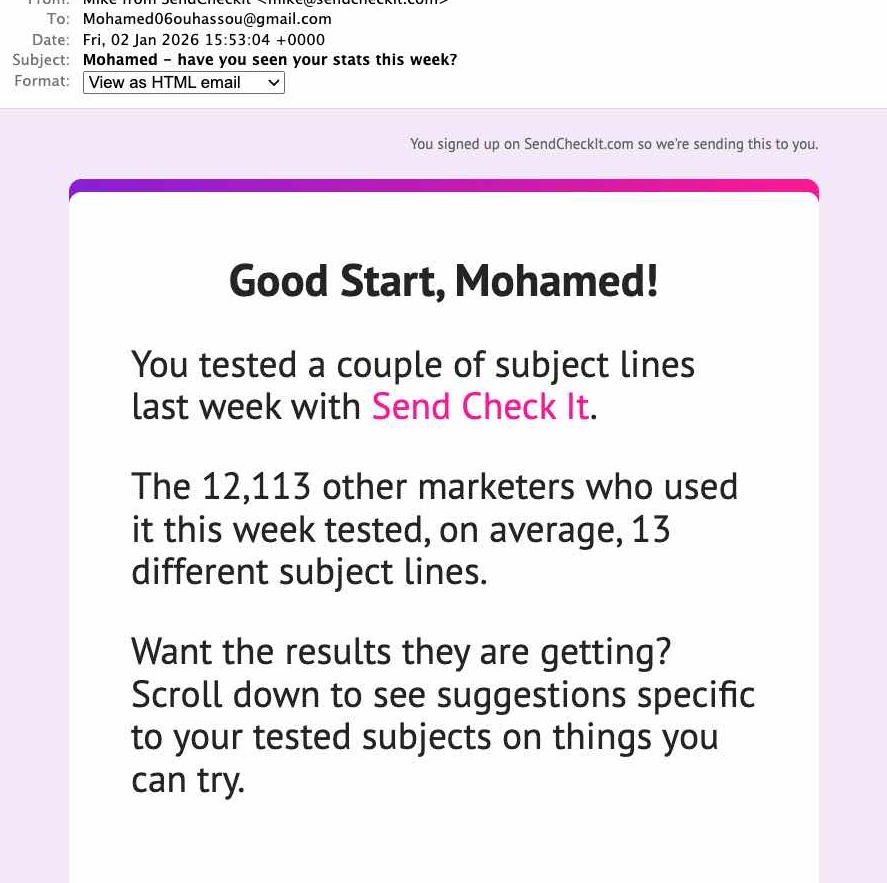
The simplest explanation: an HTML email contains images and colors while a plain text email contains no images, no graphics, and no formatting.
Here's what that looks like in practice. At SendCheckIt, we send both plain text and HTML versions of our weekly emails using multipart MIME (more on that later). Here's the plain text version:
And here's the same email as HTML:
Many people mistakenly call HTML emails with minimal formatting "plain text emails." These emails are actually HTML, but designed to appear as if coming from a colleague or friend. They feature no or very minimal use of graphics and simple text formatting. Here's an example:
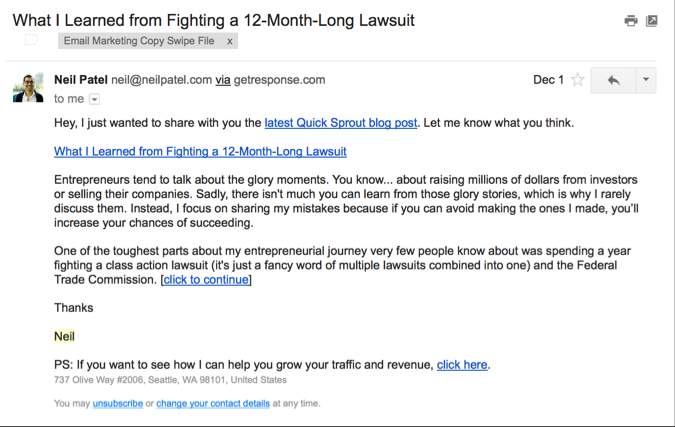
We'll call these hybrid emails because even though they are not exactly plain text, they do imitate plain text emails.
Pros and Cons of Each Email Type
Plain text email pros
All email clients display plain text emails the same, ensuring consistent delivery. The message appears more personal, not automated. Some devices like the Apple Watch handle plain text better than HTML. Plain text automatically adapts to dark mode (important as 70% of iOS users enable dark mode).
Plain text email cons
Significantly decreased ability to track emails sent. No colors, graphics, or formatting. Emails may lack visual appeal. Harder to make call to actions stand out. Lacks semantic HTML structure that screen readers use for accessibility.
HTML email pros
Best tracking ability. Colors, graphics, and formatting can be used, adding visual appeal and highlighting products. Call to actions can be made more prominent with buttons, fancy formatting, and more.
HTML email cons
Some email clients and devices don't handle HTML well (if at all) resulting in a jumble of code. Images and graphics may be blocked by default in some email clients. Too many HTML elements may be linked to placement in spam and promotions folders. Requires special coding for dark mode support (unlike plain text which adapts automatically). Needs plain text fallback for WCAG accessibility compliance.
Hybrid email pros
Message still appears personal and handwritten. Easier to scan for recipients. Retains HTML's tracking ability.
Hybrid email cons
Still HTML, so some email clients may not handle it well. Luckily it's easy to send a plain text version alongside the HTML version.
Performance Comparisons
HubSpot did their own A/B testing and came to some interesting conclusions. They compared hybrid emails (referred to as plain-text) and various types of HTML emails. Here are their findings:
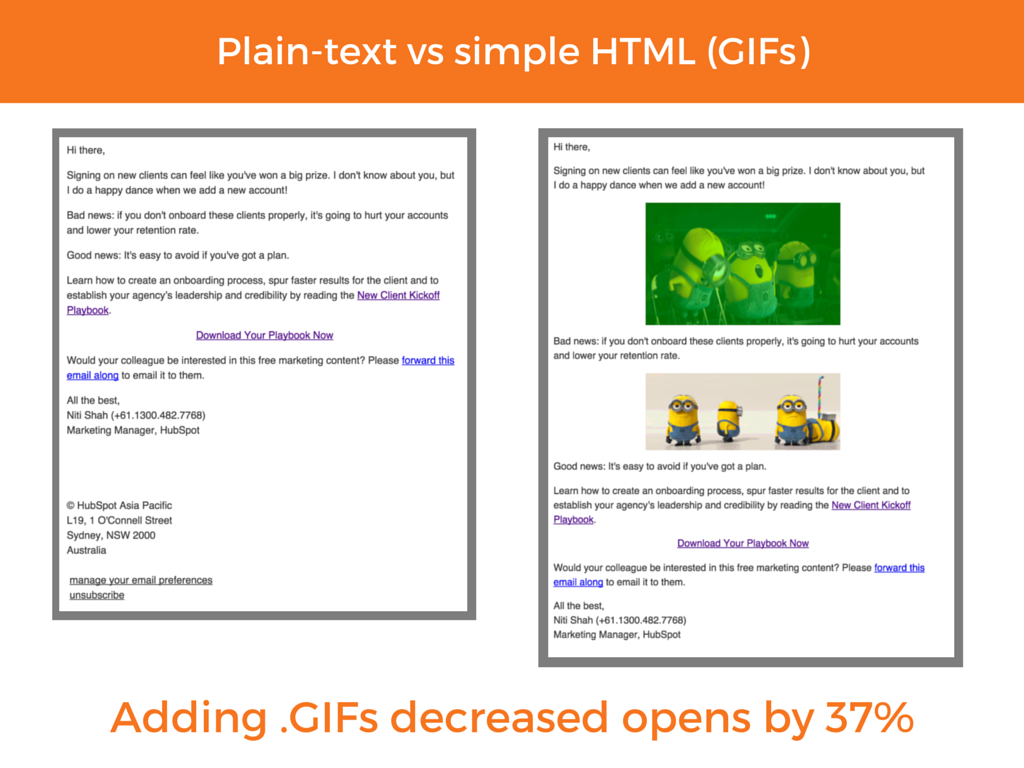
This one is the most surprising. Many people, myself included, believed that GIFs could be powerful tools for promoting engagement in email. After all, they've made their way into everything from social media to text messaging, but when it comes to email they decrease open rates by 37%.
HubSpot reasoned that the decrease in open rates could have to do with email clients failing to load the email. That could be the case. If so, we may see GIFs become more effective in email marketing as email clients adapt to GIFs.
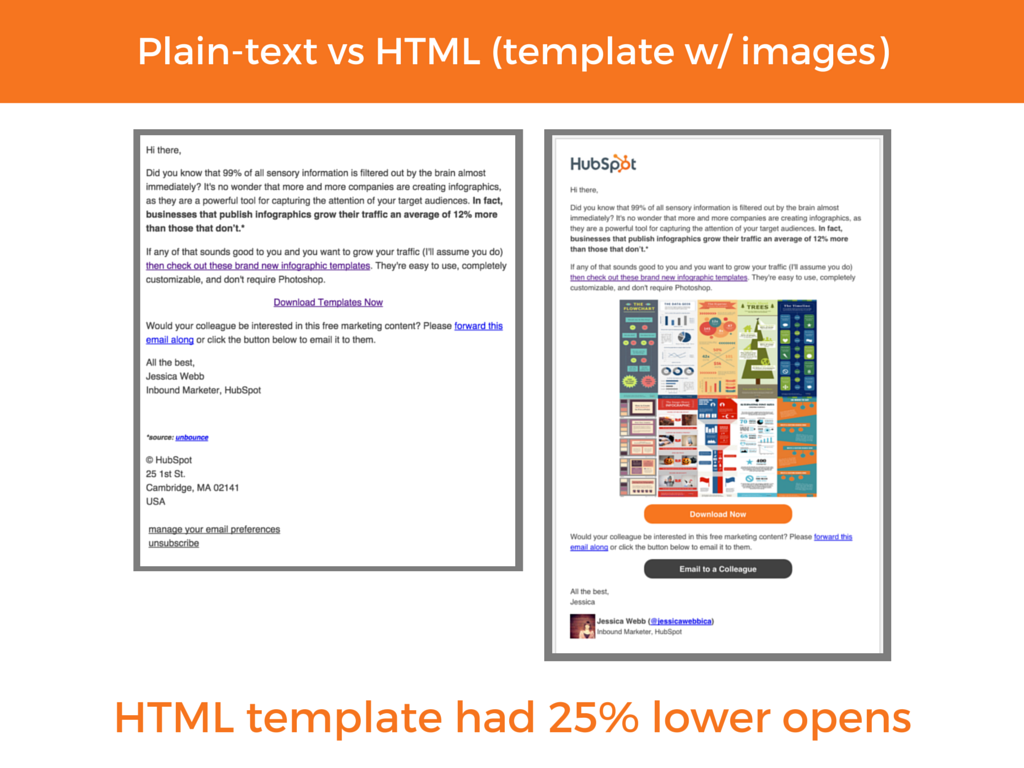
In another test, they compared plain text (again a hybrid email, still HTML with minimal formatting) with an HTML template that uses images and call to actions. The email with more visual elements performed worse than the email without any graphics or images.
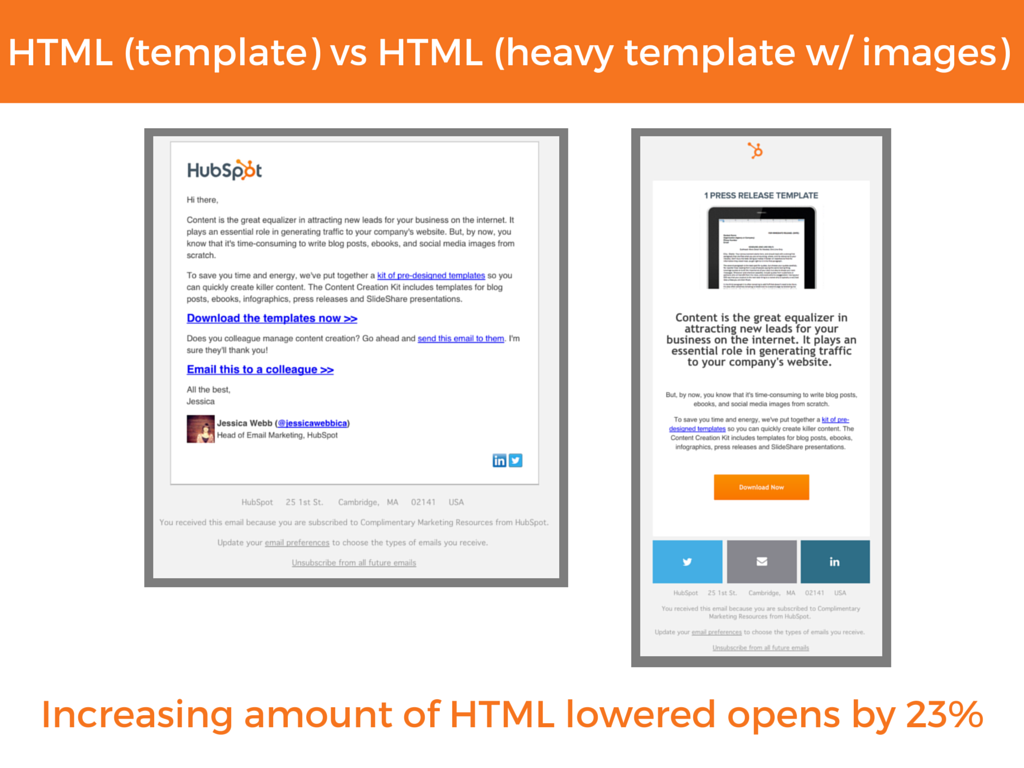
In one other test, they compared an email with minimal HTML formatting to a heavily formatted template containing images and call to actions. There was a drop with the more complex email. HubSpot reasoned that the change has to do with deliverability, so they went on to do one more test.
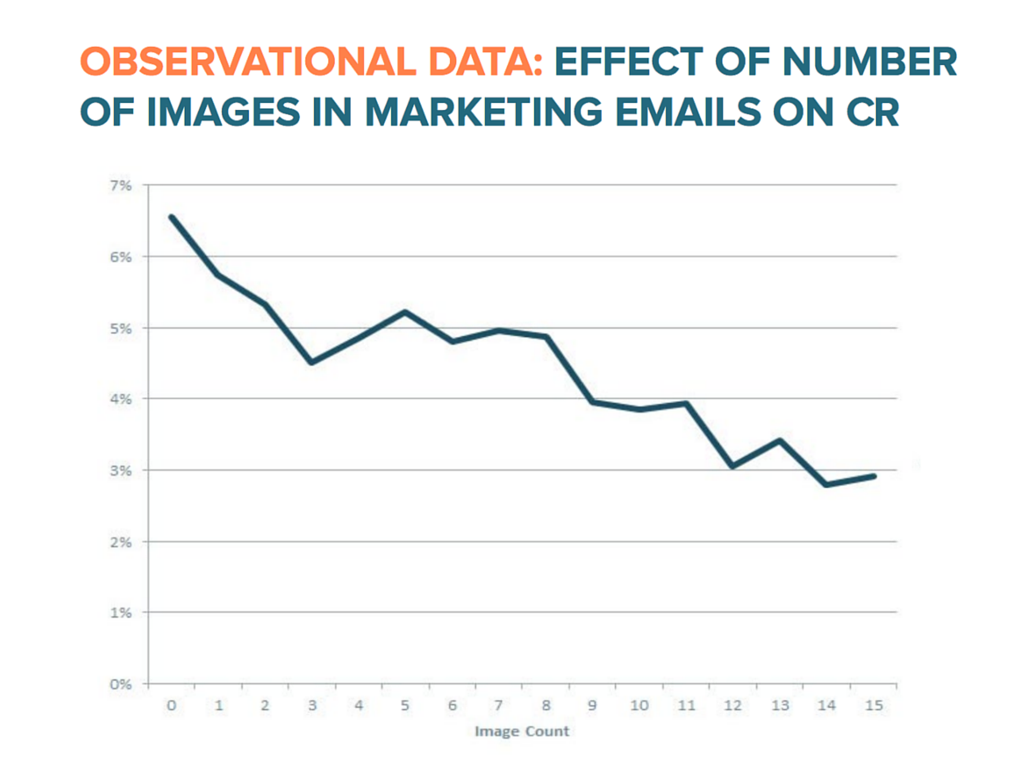
For HubSpot's last test, they compared the click rate of emails based on the number of images within. While there are a few dips and rises, the trend is clear: more images equals less conversions. But why is this? After all, images on social media perform much better than just text posts and are generally considered to be "click magnets."
2024-2025 Data: The Trend Continues
Recent studies confirm that the patterns HubSpot identified back in 2017 have only intensified. According to 2024 research:
Plain text emails achieve 23% higher open rates in B2B campaigns compared to HTML versions. Studies show plain text emails can get 42% higher click rates compared to HTML emails in certain contexts. One case study found a plain text email achieved a 28% open rate and 4.7% CTR, while the same content as HTML got only 12% open rate and 1.3% CTR. 61% of email opens now happen on mobile devices, where plain text loads instantly without rendering issues.
The gap between plain text and HTML performance has actually widened as spam filters have become more sophisticated and mobile usage has increased.
Explaining the lower performance of HTML emails
According to HubSpot, the trend has to do with email clients' ever-changing filtering systems. They believe that the number of HTML elements contributes to whether or not the email is considered spam or promotional. An email with heavy HTML formatting and several images may be deemed promotional and thus never seen by the subscriber.
But I believe the cause is deeper. Image tags and HTML-rich templates may be flagged more often, but that's only a small piece of the puzzle. A bigger piece has to do with the behavior of recipients and their expectations of email in general.
Today's average inbox is flooded with more than 100 emails a day, but it wasn't always that way. Email, originally, was a platform for 1-to-1 interaction. You'd email your friends, family, and co-workers. Maybe you'd get the occasional forwarded funny email, but most of the time, your email was used to communicate.
Nowadays, email is seen as more of a promotional avenue. Consumers exchange their emails for discounts and notifications of sales. This led to marketers creating more flashy and salesy emails, but the heart of email isn't flashy or salesy. It's that aspect of 1-to-1 communication.
This is where HTML emails fall short. They may look nice. Subscribers may say they want those emails. But the truth is they're looking for what feels like a 1-to-1 interaction.
New Considerations for 2024
Beyond performance metrics, several new factors have emerged that affect the plain text vs HTML decision.
Accessibility is now mandatory. WCAG 2.2 guidelines and Section 508 compliance require that emails be accessible to people with disabilities. HTML emails with proper semantic markup are actually better for screen readers, but they must include a plain text fallback. This means the answer isn't "plain text OR HTML" but rather "both, sent together as multipart MIME."
Dark mode changed the game. With 70% of iOS users enabling dark mode and Apple Mail commanding 56% of email consumption market share, dark mode support is critical. Plain text emails automatically adapt to dark mode, while HTML emails require special coding with color-scheme meta tags to avoid unreadable white backgrounds on dark screens.
Deliverability filters are smarter. Modern spam filters use AI and machine learning to detect marketing emails. Plain text has a significant deliverability advantage because it appears as personal communication. For cold outreach and B2B emails especially, plain text is often the only way to reliably reach the inbox. (For a deep dive on this topic, see our email deliverability guide.)
Mobile dominance is complete. With 61% of emails now opened on mobile devices, the format that loads fastest and displays reliably wins. Plain text excels here with instant loading and perfect rendering across all devices.
So, the answer is to use plain text emails?
Not exactly. This is why I said it's not a clear cut debate in the opening paragraph. Plain text (or more specifically, hybrid emails) may perform better for HubSpot, but that's not the case for everyone.
There is the possibility of lower engagement rates when using hybrid emails or plain text emails. Derek Halpern from DIYThemes shares: "In my experience, when you send the full text, you get less comments, less social media shares, and overall, LESS interaction with your subscribers."
While his experiences don't necessarily line up with other results, it's an important reminder: every business and every audience is different. Because of this, there is no clear cut winner in this debate.
For a B2B company, plain text may make more sense. It's being sent to an inbox where the recipient expects 1-to-1 communication. However, in the case of an eCommerce company, an HTML email may make more sense. Subscribers expect images in that case, and sending an email without them could be jarring and result in fewer clicks.
Conclusion
So, with all that said, here's the updated answer to the 10+ year old debate: In email, less is more, but accessibility and deliverability require both formats.
The best practice in 2024 is to send multipart MIME emails that include both plain text and HTML versions.
This approach ensures accessibility compliance (WCAG 2.2, Section 508), maximizes deliverability across spam filters, provides dark mode compatibility, maintains branding for recipients who prefer HTML, and offers a fallback for every email client.
For each HTML element you add, ask yourself if it's actually crucial. Simpler is still better, even when using HTML.
To determine the optimal format for your specific audience, A/B testing remains essential. What works for HubSpot may not work for your audience. Test plain text vs minimal HTML (hybrid style), light HTML vs heavy HTML, low image count vs high image count, and multipart MIME vs HTML-only.
In 2024, also test dark mode rendering (especially for HTML emails), inbox placement rates by format (use deliverability testing tools), accessibility with screen readers, and mobile vs desktop performance.
Following this testing framework, you'll understand how your audience responds to different formats across all the dimensions that matter today.
Further Reading
- Email Deliverability: How Plain Text vs HTML Affects Your Inbox Placement - Deep dive into spam filters, authentication, and format-specific deliverability strategies
- Comprehensive Email and Data Privacy Compliance Guide - Legal requirements for email marketing including accessibility considerations