
What's an Email Tracking Domain?

Corporate email security systems block generic tracking domains from Mailchimp, SendGrid, and others. Learn why custom tracking domains are critical for B2B email deliverability in 2026.
2026 Update: Corporate email security systems now block generic tracking domains from major email providers. If you send B2B emails without a custom tracking domain, your emails might get quarantined or your links stripped before recipients see them.
A Letter in the Void
Write a long heartfelt letter to a loved one, tuck it into a bottle and violently hurl it out into the cold uncaring sea.
That's how marketers feel when they hit send on their email campaigns.
Analytics matter because of two metrics:
- How many people opened the email
- How many people clicked a link
These basic metrics tell you whether people responded to your subject line, whether they cared about your content, and what to do better next time.
Tracking domains collect this data.
What is a Tracking Domain?
A tracking domain is the URL used for analytics collection in your emails. Just like www.hubspot.com points to Hubspot's website, a tracking domain like tracking.some-email-service.com points to the email service's web application that collects opens and clicks.
Can Recipients See the Tracking Domain?
Usually, no. There are two exceptions:
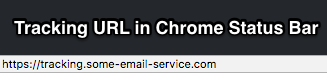
When they hover over a link on desktop, the status bar shows the URL.
When they click a link, they hit the tracking server first before getting redirected. If anything is slow (their internet, the tracking server, the destination site), they'll see the tracking domain URL.
Why Use a Custom Tracking Domain?
Corporate Email Security Blocks Generic Tracking Domains
If you send B2B emails, this matters. Corporate email security systems now automatically block emails with links to known tracking domains. Proofpoint, Mimecast, Barracuda, and Microsoft Defender actively block generic tracking domains like click.mailchimp.com, tracking.constantcontact.com, or links.sendgrid.net.
These domains get blocked because phishers and malware distributors use them constantly. Security teams have blacklisted hundreds of shared tracking domains from email service providers.
What happens: Your legitimate marketing email gets blocked or quarantined. Sometimes your links get stripped out entirely. Even if the email arrives, corporate security gateways often rewrite or block clicks on known tracking domains.
The fix: Use a custom tracking domain on your own company's domain (like track.yourcompany.com). This bypasses blocks because it's unique to your organization, builds trust with email security systems, ties to your domain's existing reputation, and can't be used by phishers pretending to be other companies.
For B2B email marketers, this isn't about branding. It's about whether your emails get delivered and whether your links work.
People Don't Trust Unfamiliar Domains
Most email subscribers don't understand how email marketing works. When they click something in your email and see a weird domain in their browser, they think you're doing something shady, the email is fake, something went wrong, or some random third party is tracking them.
A custom tracking domain fixes this. You use your own branded subdomain instead of a generic email service domain.
So https://tracking.example-email-service.com becomes https://track.my-cool-shop.com. Better experience, better deliverability.
Example
Here's someone questioning a tracking domain back in 2013:
@AllenSnook Looks like just the marketing email tracking domain. Not malicious, but a bad choice on their part for this email.
— James Huff (@MacManX) March 2, 2013
Where Do Tracking Domains Fit in Email Creation?
You can be productive in email marketing without ever directly touching a tracking domain. Most email services handle it transparently.
Here's the typical flow:
You write and design your email. You run it through the Subject Line Analyzer. After preview and testing, you send.
The email service rewrites both HTML and text versions to include a tracking image and make links clickable. These tracking links only get inserted in the final send, not in previews or test emails you send yourself.
How Does a Tracking Domain Collect Metrics?
Email Opens
The primary way to know if someone opened your email is with a tracking image. These used to be 1px by 1px invisible gifs. Now, most tracking just references an image that never loads.
In a tracked email's HTML, you'd see:
<img src="https://tracking.email-service.com/20303493024">
When someone's email client loads this, it tells the server that contact 20303493024 opened the email.
Link Clicks
You add links in your emails for calls to action, support, sales, whatever.
When you create the email, your link looks like:
https://my-store.com/item/22
The tracking system transforms it into:
https://tracking.email-service.com/my-store.com/item/22
People who click hit your email service's tracking server first. Their click gets recorded, then they're redirected to your original URL.
With a custom domain, the link becomes:
https://tracking.my-store.com/my-store.com/item/22
Tracking servers pass through all parameters, so your UTM codes, item IDs and other tracking data stay intact.
How to Set Up a Custom Tracking Domain
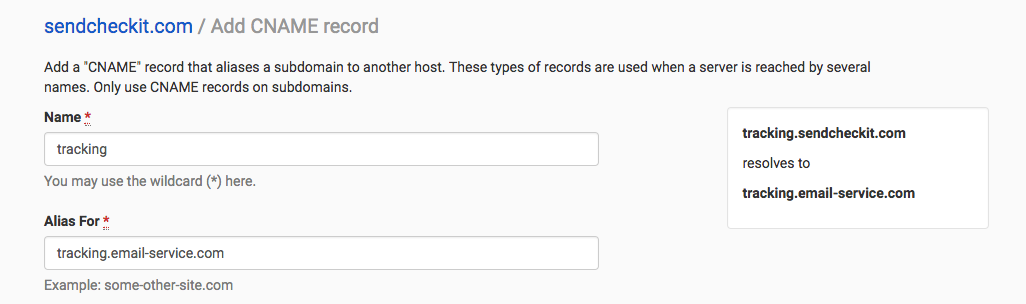
Follow your email service's specific instructions, but generally you create a DNS CNAME record.
If you don't have access to your domain's DNS, you'll need IT help.
What's a CNAME Record?
A CNAME is an alias record. It gives an alternate name for a server. Unlike forwarding (which shows the new domain to users), a CNAME hides the real server. Anyone can look up what a CNAME points to, so this isn't security.
Technically, everything works the same. The only difference is that recipients see your branded domain instead of something confusing.
Example CNAME Setup
This is from our DNS provider (DNSimple). Yours will look different but the setup is similar.
What Should You Name Your Custom Tracking Domain?
Ad Blockers
Ad blockers use pattern matching. Many are simplistic and block anything matching known patterns. You can easily create a custom tracking domain that triggers ad blockers by accident.
Test your domain against uBlock Origin and Ad Block Plus with private tracking enabled.
Build Trust
Some people are sensitive about tracking. Choose a domain that builds trust, not one that turns people away.
The Bottom Line
Tracking domains collect email analytics. In 2026, using a custom tracking domain is critical for deliverability, especially in B2B.
Corporate email security systems block emails with shared tracking domains from major providers. Generic domains like click.mailchimp.com or links.sendgrid.net get abused by phishers and malware distributors, so security teams blacklist them.
Setting up a custom tracking domain improves deliverability by avoiding security blocks, increases click-through rates by keeping links intact, builds trust with security systems and recipients, ties tracking to your domain's reputation, and costs nothing but a DNS change.
For B2B marketers emailing enterprise addresses, a custom tracking domain can mean the difference between your email being read or quarantined. For consumer marketers, it's more professional and trustworthy.
If you care about email marketing effectiveness, setting up a custom tracking domain should be a top priority.